What AI Can Automate Inside a CRM
Quick Answer: AI can automate repetitive CRM tasks such as call summaries, follow-up drafts, lead scoring, tagging, routing, and record research, but humans should still control pricing, approvals, sensitive customer communications, escalations, and high-risk decisions.
TLDR
- AI is best for repetitive, reviewable CRM tasks.
- Good use cases include summaries, drafting, tagging, scoring, routing, and pattern spotting.
- Bad use cases include pricing, escalations, customer promises, and sensitive replies without review.
- A messy CRM makes AI worse, not smarter.
- The safest rollout starts with one or two low-risk workflows.
- Many businesses need an AI Readiness Review or a CRM Audit before they automate anything serious.
AI inside a CRM is getting pushed hard because the upside is real. Teams want faster follow-through, cleaner notes, less manual work, and better pipeline visibility. The problem is that many businesses are trying to automate chaos. That usually ends the same way: faster mistakes, worse handoffs, and more cleanup later.
If you want AI to help your team rather than confuse it, you need to separate what belongs to software from what still belongs to judgment.
Start With an AI Readiness Review
If you want to figure out what AI can safely automate inside your CRM, start with an AI Readiness Review before you add another layer to a messy system.
Why AI Belongs Inside a CRM in the First Place
A CRM already holds the context that most teams need to work from. It tracks contacts, companies, deals, notes, activities, tasks, and communication history. That makes it one of the best places to use AI because the model can work from real customer and pipeline context rather than a blank prompt.
Major platforms already document AI features tied to CRM workflows. HubSpot supports summaries and research assistance. Salesforce supports summaries, scoring, and call insights. Microsoft positions Copilot inside Dynamics workflows. Zoho uses Zia for reminders, communication analysis, and best-time-to-contact suggestions. These are real product behaviors now, not speculative feature page nonsense.
That said, available does not mean safe everywhere. A feature existing in a CRM does not mean your business should let it run loose.
What AI Can Automate Inside a CRM Right Now
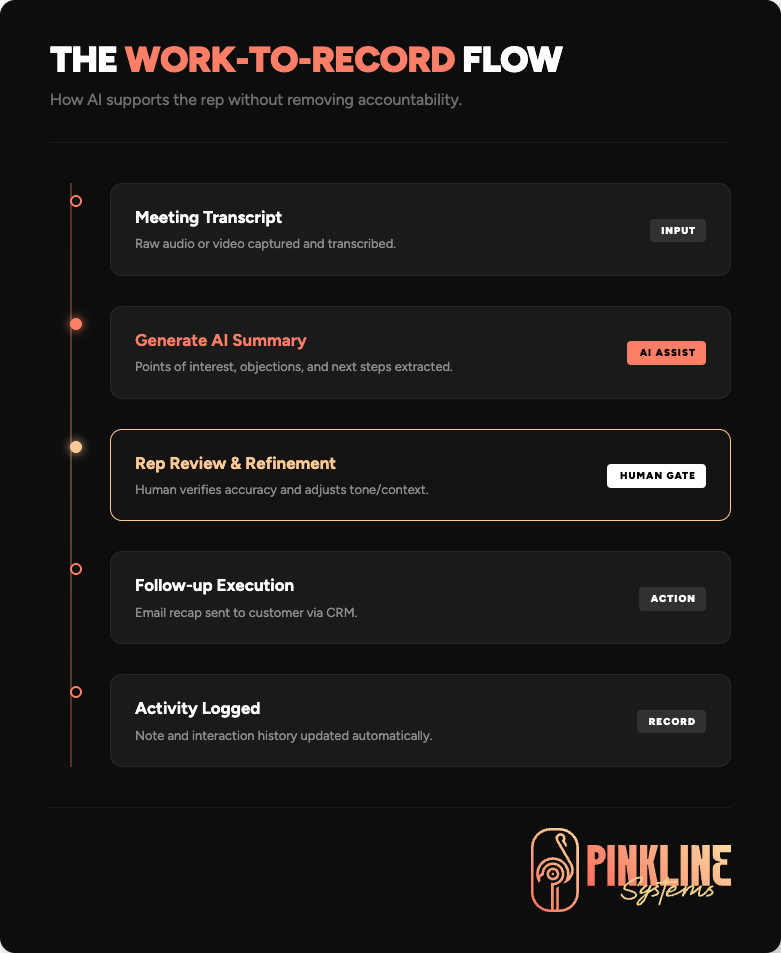
The strongest AI use cases inside a CRM share three things. The work is repetitive. The input already exists in the system. A human can quickly review the output. That is where AI usually creates time savings without creating operational risk.
| CRM Task | What AI Can Do | Why It Works |
| Call and meeting summaries | Turn transcripts and notes into short summaries with next steps | Fast to review and useful for follow-through |
| Follow-up drafting | Draft recap emails and next-step messages | Saves time on repetitive communication |
| Record summaries | Summarize lead, contact, account, or opportunity history | Helps with handoffs and faster context-building |
| Lead scoring | Surface likely priorities or engagement signals | Useful for triage and queue management |
| Tagging and categorization | Label notes, conversations, and records by topic or intent | Improves organization and reporting |
| Routing support | Help assign leads, tasks, or records using rules | Useful when process rules are already defined |
| Pattern spotting | Identify stalled deals, recurring objections, or missing next actions | Good for coaching and process improvement |
| Research assistance | Surface company background or account context before outreach | Reduces prep time for reps and managers |
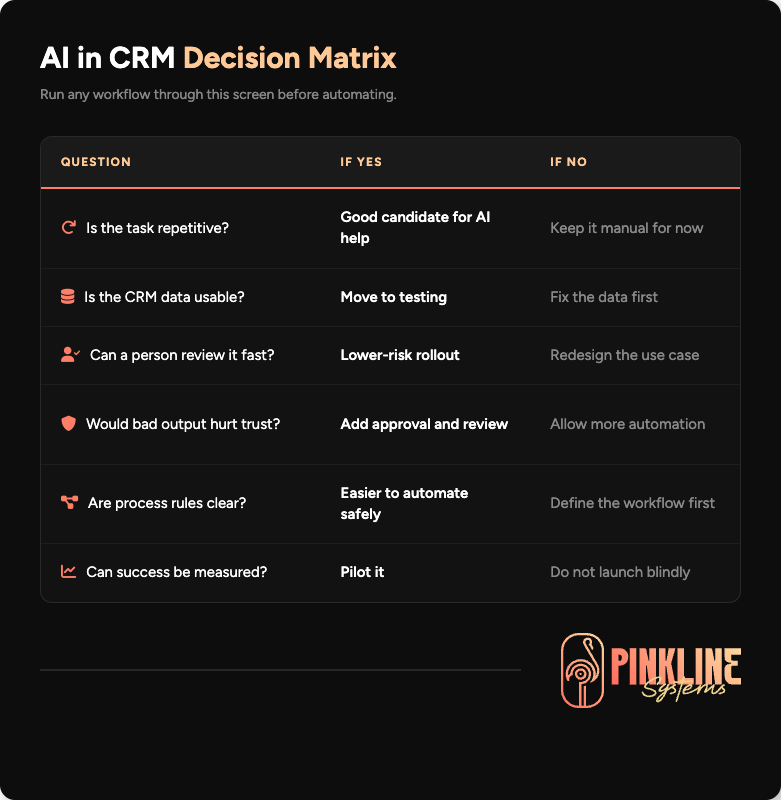
Those are the practical wins. None of them require pretending the software is a sales director, account manager, and operations lead rolled into one. They work because they support the team rather than replace accountability.
If your business is trying to reduce manual work across sales and ops, this is where workflow automation and integrations start to overlap with AI support in a useful way.
What Still Needs a Human
This is where a lot of AI content goes off the rails. Human judgment is not some outdated inconvenience. It is the thing that keeps customer relationships, margins, approvals, and edge cases from going sideways.
AI can support decisions. It should not own high-trust, high-risk, or exception-heavy work on its own.
| CRM Activity | Who Should Own It | Reason |
| Pricing decisions | Human | Margin, negotiation, and deal context require judgment |
| Sensitive customer replies | Human | Tone and relationship risk matter too much |
| Escalations and complaints | Human | These need accountability and nuance |
| Approval workflows | Human with system support | AI can assist, but a person should sign off |
| Forecast commitments | Human | Leadership cannot delegate accountability to a score |
| Pipeline stage definitions | Human | The business must decide what each stage means |
| Compliance-sensitive outreach | Human reviewed | Legal and privacy risks can be high |
| Reviews and testimonials | Human | Fake or misleading content creates trust and legal risk |
| Strategic process design | Human | AI can help brainstorm, but humans need to decide how work should run |
The line is simple. If the output can seriously affect trust, revenue, legal exposure, or customer relationships, a human still needs to own it.
The Real Constraint Is Usually Not the AI Tool
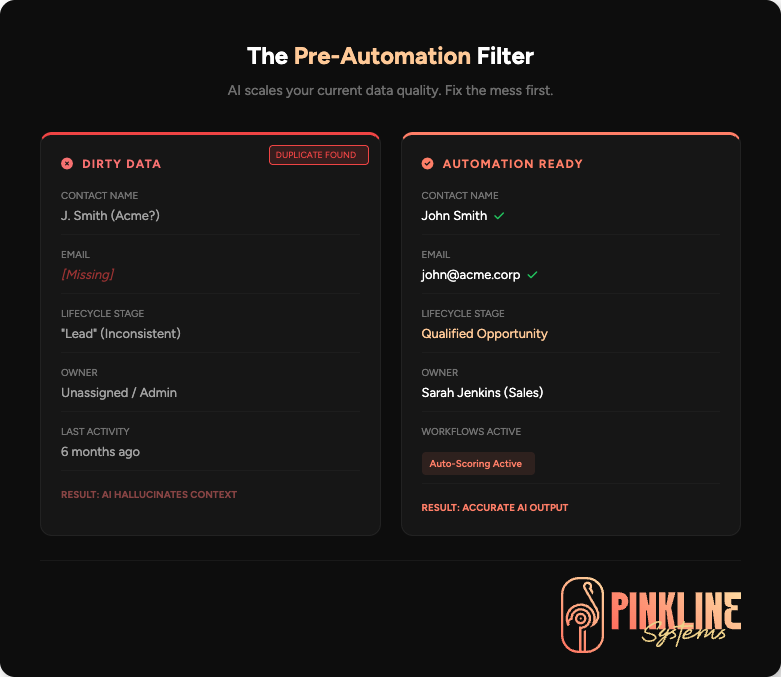
The real constraint is usually the CRM itself. If the records are inconsistent, ownership is fuzzy, stages are vague, or reporting is weak, AI does not fix that. It just scales the confusion faster.
This is why so many teams feel disappointed after adding AI features. The root problem was never the model. It was a bad structure, bad data hygiene, and unclear workflow rules.
The practical order usually looks like this:
- Clean the CRM.
- Clarify the pipeline and workflow rules.
- Fix ownership and reporting gaps.
- Choose one or two safe automations.
- Keep human review where judgment matters.
If the system underneath is already a mess, start with CRM cleanup, reporting, and dashboard setup, or a CRM Audit, before you pile AI on top of it.
The Best First AI Workflows for Most CRM Teams
Most businesses do not need a giant autonomous setup on day one. They need one or two useful, low-risk wins they can review and measure.
The best first AI workflows are the ones that save time without taking control away from the team.
Good First AI Use Cases
- Summarizing calls and meetings into clean notes
- Drafting follow-up emails after calls
- Summarizing account history before a handoff
- Surfacing stalled deals and missing next actions
- Tagging records for reporting or routing
- Suggesting best-time-to-contact windows
- Helping managers spot patterns in pipeline activity
Bad First AI Use Cases
- Sending customer-facing messages with no review
- Changing deal values or stages automatically with weak logic
- Handling pricing objections by itself
- Making approvals in regulated or high-trust situations
- Writing reviews, testimonials, or promises on behalf of the company
- Acting as a substitute for process ownership
The difference is not complicated. Good first use cases are narrow, reviewable, and reversible. Bad first use cases can cause revenue loss or erode trust before anyone catches the problem.
Related reading: If your issue is not AI itself but a system that nobody trusts, read Signs Your CRM System Needs an Audit.
How to Decide What to Automate First
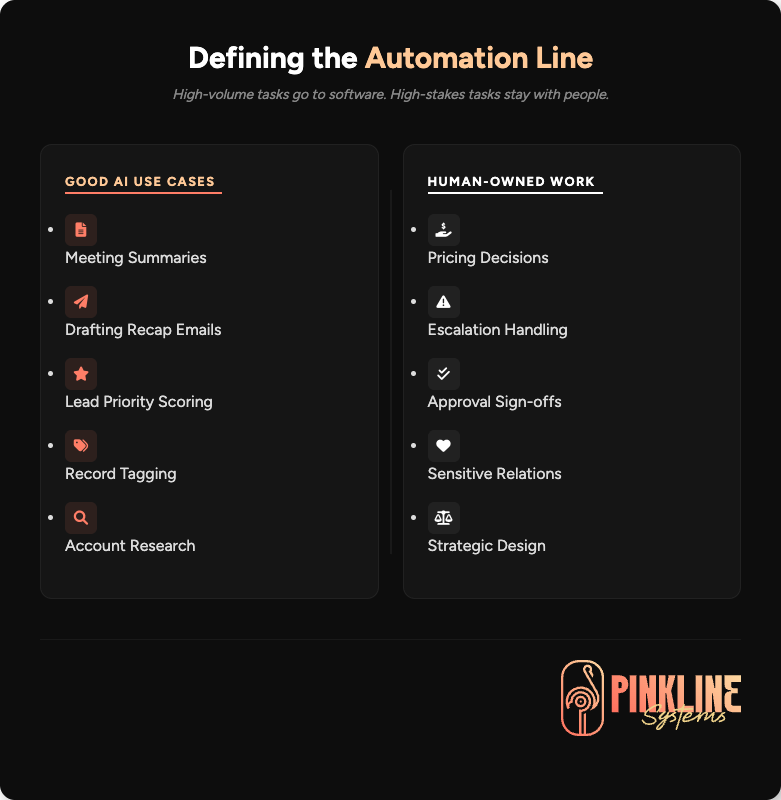
You do not need a grand theory here. You need a filter. Before you automate anything inside your CRM, run it through a simple decision screen.
| Question | If Yes | If No |
| Is the task repetitive? | Good candidate for AI help | Keep it manual for now |
| Is the CRM data usable? | Move to testing | Fix the data first |
| Can a person review the output fast? | Lower-risk rollout | Redesign the use case |
| Would a bad output hurt trust or revenue? | Add approval and review | You may allow more automation |
| Are the process rules already clear? | Easier to automate safely | Define the workflow first |
| Can success be measured? | Pilot it | Do not launch blindly |
This is the real AI-readiness question. Can the software do it? The real question is whether this workflow should be automated in your business or in your CRM, given your current level of process control.
Common AI in CRM Mistakes
A lot of teams make the same mistakes in the same order. That should be embarrassing for them, but useful for you.
Automating Before Cleaning Data
If your fields are inconsistent, records are duplicated, or ownership is sloppy, AI outputs will reflect that mess.
Starting With Customer-Facing Automation
Internal assistance is safer than external promises. Start inside the system before you let software speak for the business.
Treating AI Confidence Like Accuracy
A polished output can still be wrong. Clean formatting is not the same as reliable judgment.
Ignoring Governance
If nobody owns the rules, approvals, and review process, the workflow is not mature enough for serious automation.
Trying to Automate Everything at Once
Most teams do better with one or two pilot workflows, clear ownership, and a simple measurement plan.
Platform Examples: What This Looks Like in Real CRM Systems
You do not need to be loyal to one platform to understand the pattern. The use cases are broadly similar across the major CRM ecosystems.
HubSpot
HubSpot uses AI for summaries, research support, and CRM assistance tied to record context and workflows.
Salesforce
Salesforce uses AI for summaries, call insights, predictive scoring, activity capture, and account research.
Microsoft Dynamics 365
Microsoft positions Copilot and AI assistance across sales and service workflows inside Dynamics.
Zoho CRM
Zoho uses Zia for reminders, communication analysis, and best-time-to-contact suggestions.
The strongest cross-platform pattern is this: the best AI features support the operator. They do not replace accountability. If your next move includes restructuring or switching systems first, that is where CRM migration, workflow automation, and integrations come into play.
When an AI Readiness Review Makes Sense
You should consider an AI Readiness Review if leadership wants AI in sales, service, intake, or follow-up workflows, and your team is not sure what is safe to automate. It also makes sense when your CRM is mostly usable, but you need help deciding which tasks are a good fit for AI and which ones still need human control.
You should usually start with a CRM Audit first if the data is dirty, reporting is unreliable, stages are inconsistent, or your current automations are already broken.
AI readiness and CRM readiness are related but not the same. Pretending they are the same is how businesses pay for automation before they have a usable foundation.
Start With an AI Readiness Review.
Audit your CRM foundation and define what stays human.

Common Questions About AI in CRM Workflows
Once teams move past the sales pitch, these are the questions that usually matter most.
Can AI fully run a CRM by itself?
No. AI can support many CRM tasks, but it still needs human review, governance, and operational rules. It works best as an assistant inside a defined process.
What is the safest first AI workflow inside a CRM?
Internal summaries are one of the safest starting points. Call summaries, account summaries, and draft follow-ups are easier to review than live customer-facing automations.
Do I need clean data before adding AI to a CRM?
Yes. AI works better when records, stages, fields, and ownership rules are already in decent shape. Bad CRM inputs usually create bad AI outputs.
Can AI write sales emails from CRM data?
Yes. Many platforms support AI-assisted drafting. The safer way to use it is as a starting point, not as a final message that goes out unreviewed.
What should never be automated without review?
Pricing decisions, sensitive replies, compliance-sensitive communication, escalations, customer promises, and review or testimonial generation should not run without human oversight.
Is an AI Readiness Review different from a CRM Audit?
Yes. A CRM Audit focuses on system quality, structure, workflow problems, and reporting gaps. An AI Readiness Review focuses on what can safely be automated, what data is usable, and where human review still belongs.
Your CRM Should Be Ready Before AI Starts Touching Customer Work
If you want to figure out what AI can automate inside your CRM without making follow-through worse, start with an AI Readiness Review.
If the system underneath is already messy, underused, or full of workarounds, book a CRM Audit first and fix the foundation before you automate the wrong thing.
