
How to Tell if a CRM Audit Is the Right Next Step
If your CRM feels messy, unreliable, or harder to trust every month, a CRM Audit is usually the right first step. It helps you identify the root causes of missed follow-up, weak reporting, duplicate records, broken automations, and low team adoption before you waste time or money on the wrong fix.
TLDR
- A CRM Audit helps you diagnose system problems before jumping into cleanup, migration, or automation.
- Common warning signs include duplicate records, weak reporting, poor follow-through, broken workflows, and low team usage.
- If your team works around the CRM rather than within it, the setup likely needs more than minor fixes.
- Bad data and unclear pipeline rules usually create bigger problems with reporting and automation later.
- AI is not the first fix for a messy system. Clean data and clear workflows come first.
- A good audit should leave you with findings, priorities, and a practical action plan.
- If your CRM is already costing you visibility, speed, or trust, start with a Free CRM Audit.

Many teams do not realize they need a CRM Audit until the damage is already visible. Leads sit too long. Reports stop matching reality. Tasks get skipped. Automation starts firing at the wrong time, or not at all.
Speed matters more than most teams think. Research from Harvard Business Review found that companies that responded to online leads within an hour were far more likely to qualify them than companies that waited longer.
At that point, the real problem is usually not the software alone. It is the structure underneath it. A CRM that was never set up cleanly, never maintained properly, or slowly drifted out of control will keep creating friction no matter how many surface-level fixes you apply.
If you are still trying to sort out whether the system is truly broken or just badly maintained, start with our guide on the warning signs that point to a CRM Audit. It will help you diagnose the condition of the system before you decide what to do next.
Not sure if the system needs a cleanup, a rebuild, or outside help?
Start with a Free CRM Audit so you can see what is actually broken before you commit to the wrong next move.
What a CRM Audit Actually Looks At
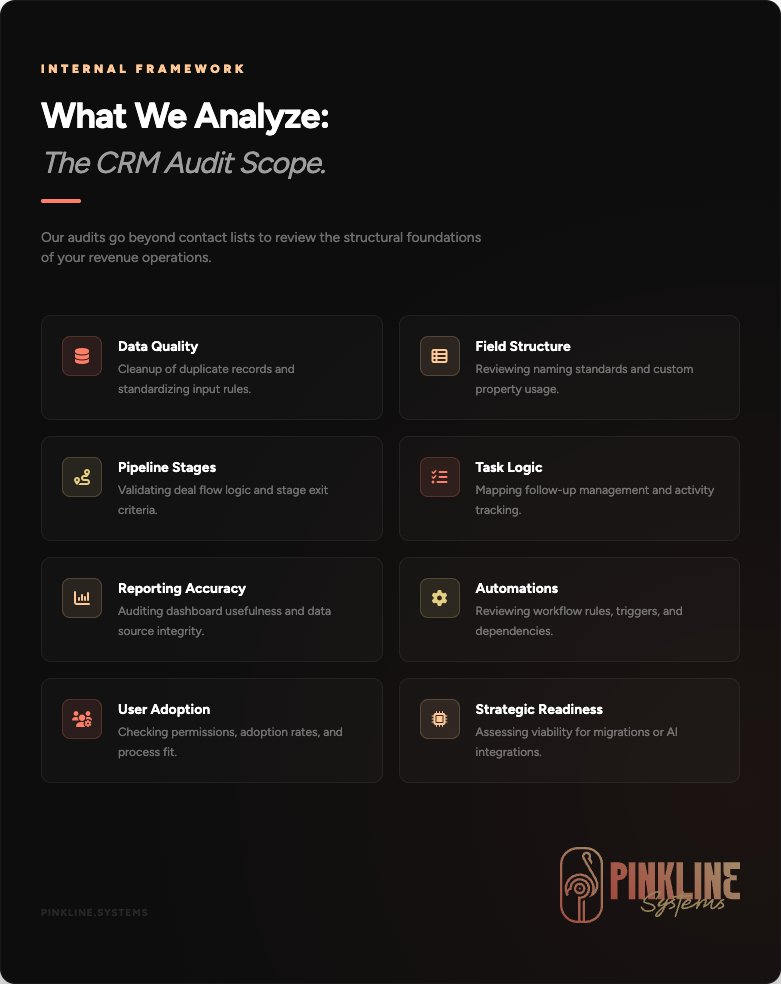
A CRM Audit is not just a quick look at your contact list. It is a practical review of how the system is built, how the team uses it, and where the current setup is creating operational problems.
A solid audit usually looks at:
- data quality and duplicate records
- field structure and naming standards
- pipeline stages and deal flow
- task management and follow-up logic
- reporting accuracy and dashboard usefulness
- automation rules, triggers, and dependencies
- user adoption, permissions, and process fit
- readiness for cleanup, migration, or AI automation
The goal is simple. Find what is broken, what is risky, what is underused, and what needs to happen first. That matters because not every messy CRM needs a rebuild, and not every underperforming CRM should be replaced.
1. Your Team Does Not Trust the CRM Data
This is one of the clearest warning signs. If your team questions the numbers every time they open a dashboard, the system has already lost credibility.
That distrust usually shows up in obvious ways. Contacts are duplicated. Properties are inconsistent. Records are incomplete. Ownership is unclear. Sales activity is missing. Nobody agrees on which fields matter, and everyone enters information a little differently.
Duplicate cleanup is not just cosmetic. HubSpot’s documentation shows that record matching, merges, and unique identifiers all affect how duplicate management works inside the system. See HubSpot’s deduplication guidance for a practical example of why messy data becomes harder to clean over time.
Once that happens, the CRM stops working like a system of record. It becomes a rough suggestion. That is where missed follow-through and bad reporting start to multiply.
If this sounds familiar, the issue is bigger than a one-off cleanup task. A CRM Audit helps you identify the root causes, not just the visible mess.
2. Leads Are Falling Through the Cracks
If leads are waiting too long, sitting in the wrong stage, or disappearing between handoffs, your CRM is not doing its job.
Sometimes the problem is simple. Tasks are not assigned correctly. Pipeline stages are too vague. Notifications are missing. Ownership rules are weak. Other times the issue is structural. The workflow itself does not match how your team actually sells or delivers service.
Either way, the result is the same. Follow-through depends too much on memory, inbox habits, or one specific employee who somehow keeps the whole thing stitched together. That is not a process. That is a liability.
If your team is missing follow-up, a CRM Cleanup project may be part of the answer, but the smart first step is still an audit.
3. Reporting Looks Busy but Tells You Nothing Useful
A lot of teams think they have a reporting problem when they really have a data structure problem.
Dashboards can only reflect what the system collects. If your fields are inconsistent, your stages are messy, or your team uses the CRM in different ways, the reports will look polished while hiding weak information underneath.
Salesforce makes this point from the data side. Their guidance on data quality ties accuracy and consistency directly to better decision-making and more reliable operations. See Salesforce’s data quality guidance.
That creates a nasty kind of false confidence. Leadership thinks the numbers are solid. The team knows they are not. Nobody fully trusts the dashboard, so people start building side spreadsheets and manual reports to check the work. That is usually the moment the CRM starts losing authority inside the business.
If reporting is unreliable, it usually makes sense to review the system before investing more into dashboards or custom reporting work. In many cases, the first move is a reporting foundation review inside a broader CRM Audit.
4. Automation Exists, but It Is Brittle or Unreliable
Broken automation is one of the fastest ways to lose trust in a CRM.
Tasks get assigned twice. Emails fire at the wrong time. Records move forward without context. Internal notifications go missing. A workflow that looked efficient during setup becomes a source of confusion six months later.
This usually happens when automation was layered on top of unclear rules, weak data, or half-finished process design. It is also common when the system changed over time but no one updated the workflows that depend on it.
Before adding new automation, you need to know if the current logic is sound. That is another reason a CRM Audit matters. It helps you separate useful automation from automation theater.
Automation should reduce friction, not create more hidden failure points.
If your workflows feel fragile or unpredictable, book a Free CRM Audit before adding anything new.
5. The Team Works Around the CRM Instead of Inside It
When a CRM stops matching real-world operations, people create workarounds. They keep notes somewhere else. They update deals at the last minute. They rely on Slack, inbox flags, or private spreadsheets to track what matters.
That behavior is easy to blame on training, but training is not always the main problem. In many cases, the setup itself is clunky. Too many fields. Poor stage logic. Confusing ownership. Task overload. Bad handoffs. Unclear expectations.
If your team keeps working around the system, the system is telling you something. It may not fit the actual process anymore. A CRM Audit helps you figure out where the mismatch lives so you can fix the setup instead of lecturing the team about usage.
If adoption is part of the problem, that usually connects to CRM Training and Adoption Support after the audit identifies what needs to change.
6. You Are About to Migrate, Rebuild, or Switch Platforms
This is the point where a lot of businesses make an expensive mistake.
They assume the answer is a new platform, then move messy data and weak logic into a fresh environment. Now the mess just has a cleaner interface and a new monthly bill.
A migration can be the right move, but it should almost never start blind. If you do not know what is wrong with the current system, you are likely to carry the same problems into the new one.
That is why a CRM Audit is a smart pre-migration step. It gives you a cleaner view of what should be kept, removed, restructured, or rebuilt before anything gets moved. If a switch is on the table, pair the audit with a look at CRM Migration services.
7. Leadership Wants AI, but the CRM Is Not Ready
This is becoming more common. Leadership sees AI tools everywhere and wants faster follow-up, better summaries, smarter routing, or more efficient workflows.
Those goals are reasonable. The problem is that AI does not fix weak structure. It amplifies whatever is already underneath the workflow.
If your data is inconsistent, your ownership rules are weak, or your process is unclear, AI will not clean that up for you. It will just operate on top of the confusion. In sensitive workflows, that can create trust, compliance, and customer experience problems fast.
NIST’s AI Risk Management Framework makes the same point in more formal language. Data quality, governance, and context all shape whether AI systems are trustworthy enough to use in real operations.
Before adding AI to your CRM, you need to know if the system is ready for it. That means clean data, clear rules, documented process, and defined points where human review still matters. If AI is on the roadmap, the right sequence is usually CRM Audit first, then an AI Readiness Review.
The FTC has also warned that AI tools can create real consumer harm when they are used carelessly or deployed with weak oversight. See the agency’s FTC guidance on AI risks.
When the Problem Is Cleanup vs. When It Is Bigger
Not every business with a messy CRM needs a full rebuild. Some systems only need cleanup, structure fixes, and tighter workflow rules. Others have deeper issues that point to a migration, redesign, or new platform decision.
The point of a CRM Audit is not to force one outcome. It is to help you choose the right one.
| What You Are Seeing | What It Often Means | Likely Next Step |
|---|---|---|
| Duplicate records, bad fields, weak reports | Data and structure problems | Cleanup and standardization |
| Broken automation and confusing stages | Workflow design problem | Audit, then process and automation fixes |
| Low adoption and constant workarounds | System no longer fits operations | Audit, then redesign or retraining |
| Planned platform switch | Migration risk | Audit before migration |
| Pressure to add AI fast | Readiness and governance issue | Audit, then AI readiness review |
This is why the audit matters so much. It keeps you from paying for cleanup when the real issue is process. It keeps you from migrating when the current system is still salvageable. It keeps you from adding automation or AI to a shaky foundation.
What You Should Get From a Good CRM Audit
A CRM Audit should leave you with more than observations. It should leave you with direction.
A good deliverable usually includes:
- a clear summary of what is working and what is not
- priority issues ranked by business impact
- risks tied to follow-through, reporting, adoption, and automation
- recommendations for cleanup, restructuring, migration, or workflow changes
- a realistic next-step plan based on the system you actually have
That is the difference between a useful audit and a vague review call. The right audit should make the next move easier to understand, easier to scope, and easier to buy.
When to Book a CRM Audit
You should seriously consider a CRM Audit if any of the following is true:
- your team does not trust the CRM data
- leads are slipping through the cracks
- reports look polished but feel wrong
- automation is brittle, noisy, or outdated
- the team works around the CRM instead of inside it
- you are considering a migration or platform change
- leadership wants AI, but the system underneath it is messy
If that list feels familiar, the right move is usually not to guess. It is to diagnose the system properly, fix the highest-impact issues first, and build from a cleaner base.
Your CRM should not be the place where leads go to disappear.
Book a Free CRM Audit to identify the gaps, clean up the risk, and get a practical plan for what to fix next.
Not ready to book yet? Contact Us and tell us what feels broken.
Still Wondering If You Need a CRM Audit? Start Here
If your CRM feels unreliable but you are not sure what kind of help you actually need, these are the questions that usually come up first. They can help you figure out whether the next step is a CRM Audit, cleanup work, migration planning, or a broader systems review.
What is a CRM Audit?
A CRM Audit is a structured review of your CRM setup, data quality, workflows, reporting, and user adoption. The goal is to identify what is broken, what is risky, and what should be fixed first.
How do I know if I need a CRM Audit?
You likely need a CRM Audit if your team does not trust the data, leads are being missed, reporting feels unreliable, automation is brittle, or people keep working around the system.
What does a CRM Audit include?
A CRM Audit usually includes a review of records, fields, stages, tasks, automations, reporting, permissions, process fit, and readiness for cleanup, migration, or AI.
Should I do a CRM Audit before migrating to a new platform?
Yes. A CRM Audit helps you understand what should be cleaned up, restructured, or removed before migration so you do not carry the same problems into a new platform.
Can a CRM Audit help if our reports are wrong?
Yes. In many cases, reporting problems come from weak data, inconsistent field usage, poor stage design, or missing activity tracking. An audit helps identify those root causes.
Do I need a new CRM, or can my current one be fixed?
Sometimes, the current CRM can be fixed with a cleanup and process improvements. Sometimes the system is no longer a good fit. A CRM Audit helps you make that decision with more clarity.
Should we fix the CRM before adding AI?
Yes. AI works better when your data is clean, your workflows are clear, and your review points are defined. If the CRM is messy, AI will usually magnify the mess rather than solve it.
Stop throwing time and money at the wrong fix.
If you are stuck between cleaning up your current CRM and replacing it completely, start with a Free CRM Audit. We will help you identify what is actually broken, what can be fixed, and what needs a bigger change.